Built for the 3am check-ins

Your child's fever. Nobody else's business.

A privacy-first iPhone app for tracking your child's temperature, medications, and reminders. Your data lives only on your iCloud — there's literally no server we could see it on.

Download on the App Store
Free for one child · iPhone, iOS 18.6+
FeverBee app screen
FeverBee app screen
FeverBee app screen
— the 2am moment

"Wait — when did I last give Tylenol?"

Every parent has been there. 2am. Half asleep. Trying to remember the dose, the time, the last reading. FeverBee answers all three in a tap, then reminds you when the next dose is due.

— what it does

Everything you need.
Nothing you don't.

— 01 · Temperature tracking

Is this a fever?

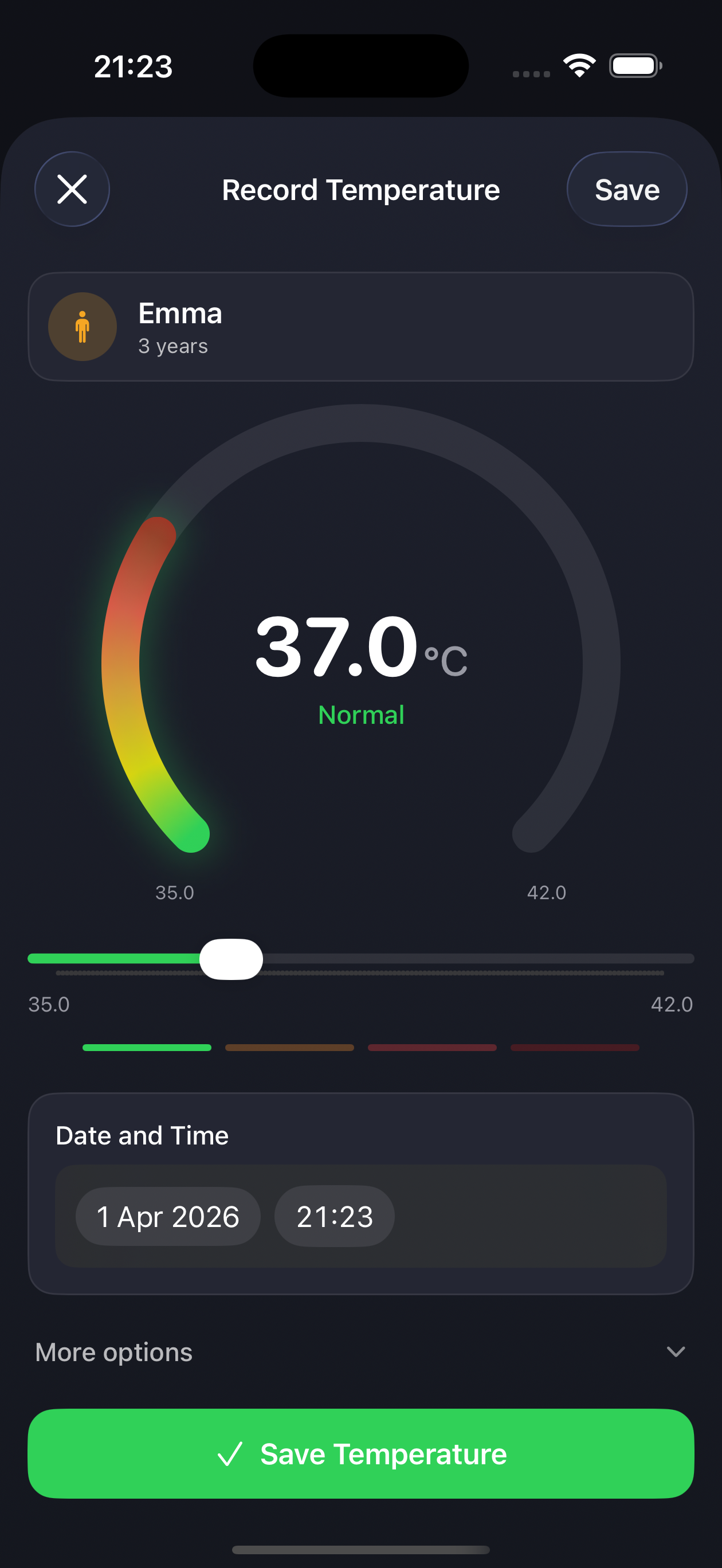
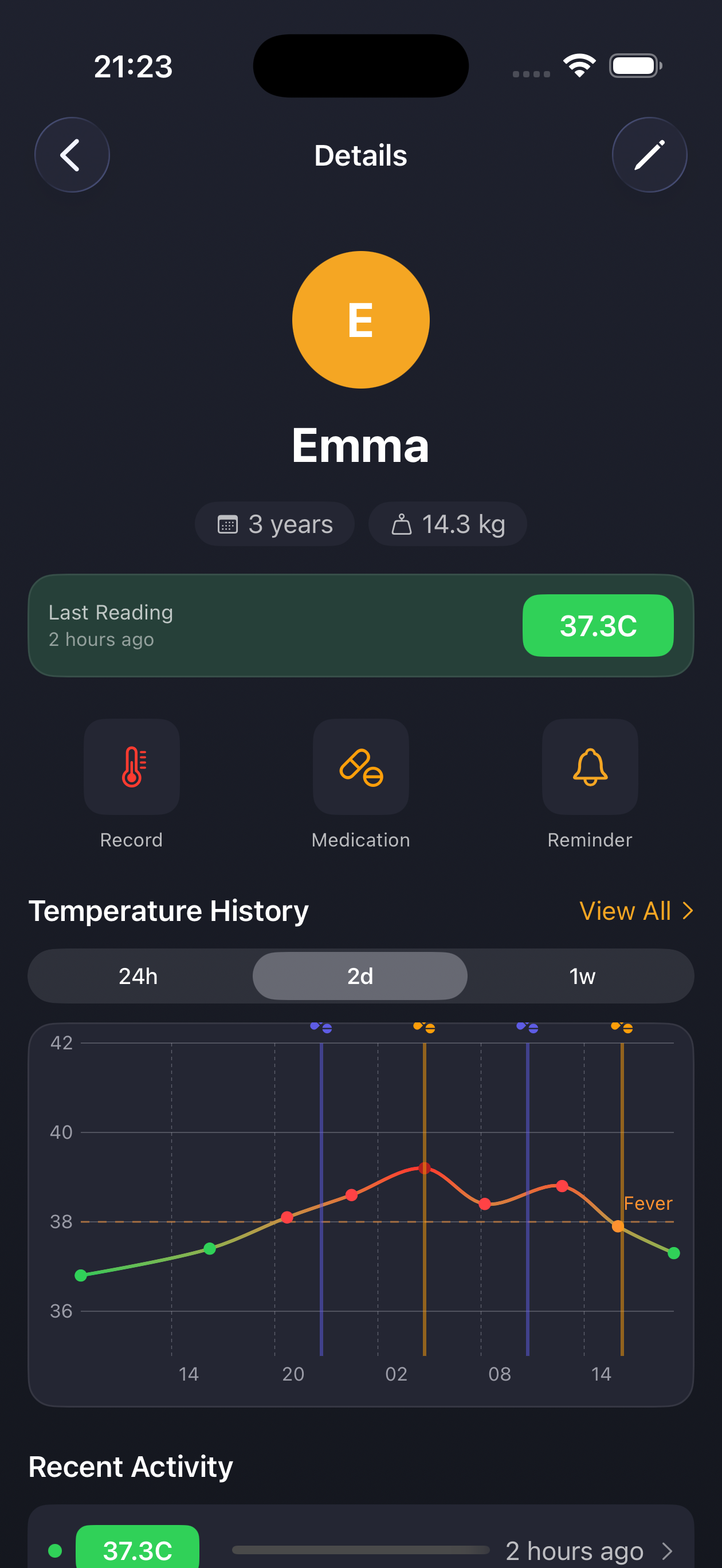
A color-coded gauge tells you instantly. Normal, elevated, fever, high fever — at a glance, no thermometer math while you're tired. Track readings over time and spot trends in built-in history charts.

  • Visual gauge with color-coded fever zones
  • Celsius or Fahrenheit
  • Charts for 24h, 2 days, a week, a month or all time
  • Add symptoms (cough, runny nose, chills)
FeverBee app screen
— 02 · Medication logging

Five-second dose log.

Log any medication — paracetamol, ibuprofen, antibiotics, anything. Pick the active ingredient, enter the dose, and you're done. Switch units between ml, mg, tablets, suppositories, or drops.

  • Paracetamol, Ibuprofen, or any custom medication
  • Units: ml, mg, tablets, suppositories, drops
  • Precise dose steps: 0.05 ml, 5 mg or whole tablets
  • Full medication history with times
FeverBee app screen
— 03 · Smart reminders

Set it. Then sleep.

Schedule the next-dose reminder right when you log the medication. The interval choices follow the active ingredient: 4 or 6 hours for paracetamol, 6 or 8 for ibuprofen, 4 to 24 for anything else. FeverBee watches the clock so you can rest. A reminder that falls in your quiet hours waits until they end, and you set those hours.

  • Intervals matched to the active ingredient
  • Quiet hours you choose (default 22:00–07:00)
  • Notifications stay on your device
FeverBee app screen
— 04 · History & profiles

Show the doctor everything.

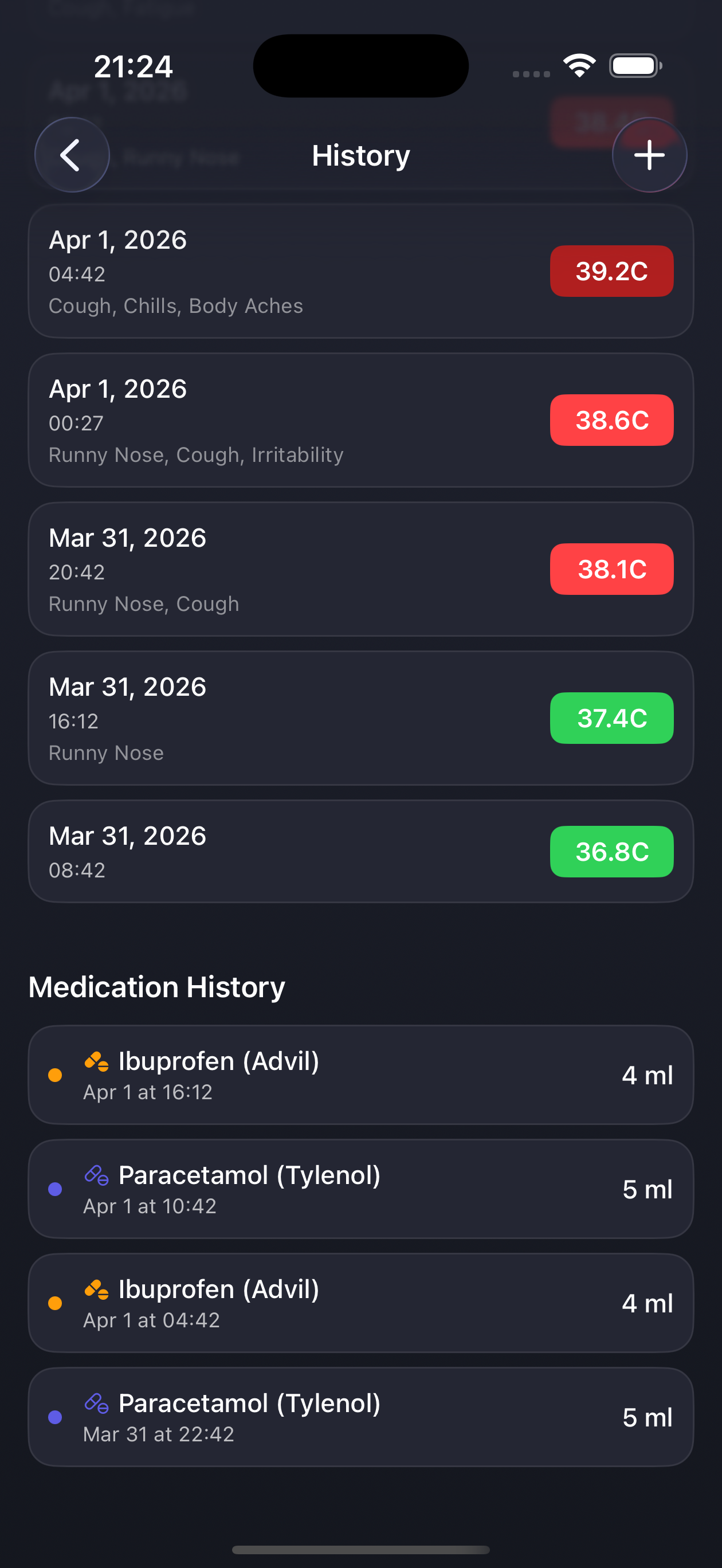
Every reading, every dose, sorted and ready. Each child gets their own profile with independent temperature, medication, and weight history. Hand over the phone, or share a PDF report for any date range.

  • Full temperature history with status badges
  • Complete medication log with timestamps
  • Weight tracking
  • PDF health report with chart and timeline
  • Switch between children in a tap
FeverBee app screen
— how it works

Three taps. That's it.

i

Add your child

Name and birth date. No account, no email — just the two of you.

ii

Record temperature

Slide to the reading. Save. The gauge tells you what it means.

iii

Log meds + reminder

Active ingredient, dose, time. Set the next-dose alert and put the phone down.

— the bee promise

What happens at home stays at home.

FeverBee has no backend. No database. No analytics. Your child's health data lives only on your devices and your private iCloud — encrypted by Apple, visible only to you and anyone you choose to share a child with. The App Store privacy label says "Data Not Collected" and we mean it literally.

On your iCloud only

Stored in your private iCloud. Encrypted by Apple. Zero access by us. Shared only if you invite someone.

No account needed

No email, no password, no sign-up flow. Just download and start.

Zero tracking

No analytics. No advertising IDs. No cookies. No third-party SDKs. Period.

Works offline

Full functionality without internet. Syncs through iCloud when you reconnect.

— the receipt
What FeverBee does NOT collect
  • Personal info (name, email, phone)
  • Health data (it's all yours)
  • Usage analytics or telemetry
  • Device identifiers or fingerprints
  • Location data
  • Advertising IDs
  • Cookies or tracking pixels
  • Crash reports linked to you
— pricing

$5.99. Once. Forever.

Track one child completely free. Unlock unlimited children and partner sharing for a one-time $5.99. No subscriptions. No ads. Ever.

Free
One child
$0

Everything you need for one little one: tracking, reminders, reports and backups.

  • Temperature & medication tracking
  • Smart reminders
  • Full history & charts
  • iCloud sync
  • Works offline
One-time unlock
Unlimited children
$5.99

Unlimited children, plus sharing with a partner. Pay once, yours forever — no subscription, ever.

  • Everything in Free
  • Track unlimited children
  • Share a child with your partner
  • All future features included
  • No subscription, ever
  • No ads, ever
— frequently asked

Quick answers.

Do I need an account?
No. FeverBee never asks for an email, password, or sign-up. Just download and start tracking.
Where is my data stored?
On your iPhone and in your private iCloud, encrypted by Apple. If you share a child with a partner (part of the unlock), that child's records also reach them through iCloud sharing. We don't run any servers, so we never see your data.
Does it work offline?
Yes, fully. Record temperatures, log meds, see history — all without internet. iCloud sync resumes when you reconnect.
Can I track more than one child?
Yes. One child is completely free. A one-time $5.99 unlock removes the limit forever.
Is FeverBee medical advice?
No. FeverBee is a tracking tool, not a doctor. Always consult a healthcare professional for medical decisions.
Does it work on iPad or Apple Watch?
FeverBee is an iPhone app. If you have several iPhones on the same Apple Account, iCloud keeps them in sync.
What if Apple changes iCloud pricing?
iCloud sync uses your existing Apple iCloud (free tier is plenty for FeverBee data — we're talking kilobytes, not gigabytes).
How do I delete my data?
Swipe to delete any record, delete a child profile, or use Settings → Delete All Data. Deletions sync to your iCloud too. Deleting only the app removes the copy on that iPhone. Your iCloud copy stays until you delete it in the app or in iOS Settings → iCloud → Manage Storage.
A quieter sick day starts here.

FeverBee is free to try. One child. No account. Unlimited everything for a one-time $5.99.